


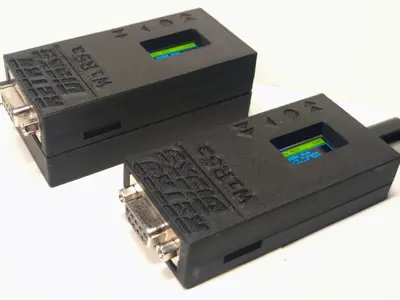
The WiRSa v3 is a WiFi-to-RS232 adapter I designed to help get vintage computers online. The hardware and firmware are completely open source. Among its features are full SLIP and PPP gateway modes, which can give many retro system a working TCP/IP path to the internet over WiFi.
Architecture
Both modes run as NAT gateways on the ESP32. The vintage computer establishes an IP link over the serial port, and the WiRSa translates between that link and its WiFi connection. Outbound traffic egresses through the ESP32's network stack, so the client appears to have direct internet access.
SLIP mode
- SLIP is the simpler of the two protocols, with minimal framing and no negotiation. I've tested it against:
- DOS with packet drivers such as ETHERSLIP
- Windows 3.x with Trumpet Winsock
- Classic Mac OS with MacSLIP
- Linux using slattach
PPP mode
PPP adds link negotiation, authentication framing, and error detection, which makes it the right choice for any client that expects to dial an ISP. Supported configurations include:
- Windows 95/98/ME Dial-Up Networking
- Windows 3.11 with RAS and TCP/IP-32
- Mac OS 8/9 with PPP / Remote Access
- Linux with pppd
Authentication credentials sent by the client are ignored, so any username and password will work.
Entering a gateway mode
There are three ways to start either gateway:
- Select PPP Gateway or SLIP Gateway from the on-device menu
- From modem mode, dial ATDT PPP / ATDT SLIP (or the phone-keypad equivalents 777 and 7547)
- From modem mode, use the direct commands AT$PPP or AT$SLIP
Port forwarding
Both modes share a single port-forwarding table that persists across reboots. This allows incoming connections from the WiFi side to reach services hosted on the vintage computer — BBS software, an FTP daemon, a Windows 95 Personal Web Server, and so on. Forwards are added through the serial menus or with AT commands.
Exiting
Pressing the BACK button on the device terminates the gateway. Over USB serial in SLIP mode, the +++ escape sequence also works. In PPP, disconnecting from the client side causes the WiRSa to detect link termination and return to the menu.
For more info on the device, check out the GitHub page.
0 Comments
Sign in to leave a comment.